No products in the cart.
Return To Shop

Sale 17%
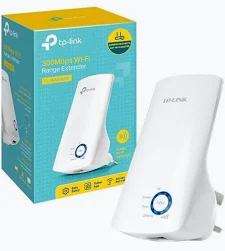
TP-Link TL-WA850RE 300Mbps Wi-Fi Extender
Original price was: KSh 3,000.00.KSh 2,500.00Current price is: KSh 2,500.00.
TP-Link TL-WA850RE 300Mbps Wi-Fi Range Extender helps eliminate Wi-Fi dead zones by extending your existing 2.4GHz wireless network. It supports up to 300Mbps Wireless N, features 2 internal antennas, a 10/100Mbps Ethernet port, WPS setup and signal-strength indicators. Its compact wall-mounted design makes it easy to install and reposition in homes, offices, shops and other small spaces.
Key Highlights
- Up to 300Mbps Wireless N
- 2.4GHz Wi-Fi
- Wi-Fi Range Extender & Access Point modes
- 1 × 10/100Mbps Ethernet port
- 2 internal antennas
- WPS/Range Extender button
- Signal-strength indicator
- Compact wall-mounted design
- TP-Link Tether support on compatible versions
- WPA/WPA2 security
- Approximately 3W power consumption

The TP-Link TL-WA850RE is a compact 300Mbps Wireless N Wi-Fi Range Extender designed to improve wireless coverage and eliminate Wi-Fi dead zones in homes, offices, apartments, shops and other small environments. It receives the existing wireless signal from your router and extends it to areas where the original Wi-Fi signal is weak or unavailable.
Operating on the 2.4GHz band, the TL-WA850RE supports wireless speeds of up to 300Mbps under 802.11n conditions. It is compatible with IEEE 802.11b/g/n wireless standards, making it suitable for extending many existing 2.4GHz wireless networks.
Its compact wall-mounted design makes installation simple and flexible. You can place the extender between your router and the area experiencing weak Wi-Fi coverage. The built-in signal indicator helps you identify a suitable location by showing the strength of the signal received from the main router. TP-Link recommends positioning the extender where at least three signal lights indicate a good connection.
The TP-Link TL-WA850RE also features a 10/100Mbps Ethernet port, allowing it to operate as a wireless adapter for Ethernet-enabled devices such as smart TVs, desktop computers, game consoles and other network equipment.
Setup can be performed using the extender button and your router’s WPS function, while compatible versions can also be managed through the TP-Link Tether app. This makes it easier to configure and monitor the device from a mobile device.
The extender includes features such as WMM, wireless MAC address filtering, wireless statistics, LED control and power scheduling, depending on the hardware/firmware version. Wireless security includes WEP as well as WPA/WPA2-PSK options.
Key Features
- 300Mbps Wireless N speed on the 2.4GHz band
- Extends existing Wi-Fi coverage to reduce dead zones
- Supports IEEE 802.11b/g/n
- 2.4GHz wireless frequency
- Range Extender and Access Point operating modes
- 1 × 10/100Mbps RJ45 Ethernet port
- Two internal antennas
- Compact wall-mounted design
- Easy WPS/Range Extender button setup
- Intelligent signal-strength indicator
- Compatible with TP-Link Tether management on supported versions
- LED control and Night Mode on supported versions
- Wireless MAC address filtering
- WMM support
- Power scheduling
- WPA/WPA2-PSK wireless security
- Low power consumption of approximately 3W
- Supports Ethernet-enabled devices as a wireless adapter
Technical Specifications
| Specification | Details |
|---|---|
| Brand | TP-Link |
| Model | TL-WA850RE |
| Product Type | Wi-Fi Range Extender |
| Wireless Standard | IEEE 802.11b/g/n |
| Wireless Technology | Wireless N |
| Maximum Wireless Speed | Up to 300Mbps |
| Frequency | 2.4GHz |
| Frequency Range | 2.4–2.4835GHz |
| Operating Modes | Range Extender / Access Point |
| Ethernet Port | 1 × 10/100Mbps RJ45 |
| Antennas | 2 × Internal Antennas |
| WPS/Extender Button | Yes |
| Reset Button | Yes |
| Wireless Security | 64/128/152-bit WEP, WPA-PSK/WPA2-PSK |
| WMM | Yes |
| MAC Address Filtering | Yes |
| LED Control | Yes, version dependent |
| Power Schedule | Yes, version dependent |
| Input Power | 100–240V AC, 50/60Hz |
| Power Consumption | Approximately 3W |
| Dimensions | 110 × 65.8 × 75.2mm |
| Installation | Wall-mounted plug-in |
| Operating Temperature | 0°C–40°C |
| Storage Temperature | -40°C–70°C |
| Operating Humidity | 10%–90%, non-condensing |
| Storage Humidity | 5%–90%, non-condensing |
| Certification | CE/RoHS; certification varies by regional version |
Wireless Performance
The TL-WA850RE supports up to 300Mbps wireless signaling using 802.11n on 2.4GHz. It also supports older 802.11g and 802.11b devices, with maximum signaling rates of 54Mbps and 11Mbps respectively.
The advertised 300Mbps is the maximum physical wireless link rate, rather than a guaranteed real-world internet speed. Actual performance depends on factors such as distance, walls, interference, router performance, connected devices and network traffic.
Ethernet Port
The built-in 10/100Mbps RJ45 Ethernet port gives the TL-WA850RE an additional function beyond basic Wi-Fi extension.
It can receive the wireless connection and provide network connectivity to an Ethernet-enabled device. This can be useful for devices such as:
- Smart TVs
- Desktop computers
- Gaming consoles
- Blu-ray players
- DVRs
- Set-top boxes
- Other Ethernet-enabled equipment
Important: The Ethernet port is 10/100Mbps, so it does not provide Gigabit Ethernet speeds.
Easy Installation
The TL-WA850RE is designed for straightforward installation.
WPS Setup
- Plug the TL-WA850RE into a suitable power outlet near your router.
- Press the WPS button on the router.
- Press the Range Extender/WPS button on the TL-WA850RE.
- Allow the devices to establish the connection.
- Move the extender to a suitable location between the router and the Wi-Fi dead zone.
The built-in signal indicators can then help you determine whether the extender is receiving a sufficiently strong signal from the router.
Signal Strength Indicator
One of the useful features of the TL-WA850RE is its signal indicator system.
The LEDs indicate the strength of the wireless signal being received from the main router. This makes it easier to find a practical position for the extender instead of simply placing it wherever a power socket is available.
TP-Link recommends choosing a location where at least three signal lights indicate a good connection.
Compact Wall-Mounted Design
The TL-WA850RE uses a small plug-in design measuring approximately 110 × 65.8 × 75.2mm. Its wall-mounted form factor helps keep installation tidy while making it easy to reposition when necessary.
It is particularly useful in areas where a larger standalone networking device would take up unnecessary space.
Management and Control
Compatible versions of the TL-WA850RE can be managed through the TP-Link Tether app, providing mobile-based access to supported configuration and control features.
Supported management features may include:
- Wireless configuration
- LED control
- Night Mode
- Power scheduling
- Access control
- Wireless statistics
- Wireless radio control
Feature availability can depend on the hardware revision and firmware.
Wireless Security
The TL-WA850RE supports several wireless security options, including:
- 64-bit WEP
- 128-bit WEP
- 152-bit WEP
- WPA-PSK
- WPA2-PSK
For modern networks, the supported WPA/WPA2 options are generally preferable to older WEP security.
Why Choose the TP-Link TL-WA850RE?
Eliminate Wi-Fi Dead Zones
Extend your existing wireless coverage into areas where the router’s signal is weak or unavailable.
300Mbps Wireless N
Provides wireless signaling rates of up to 300Mbps on 2.4GHz, suitable for everyday browsing and general network connectivity.
Simple Installation
The WPS/Range Extender button makes initial setup straightforward.
Flexible Placement
The compact wall-mounted design makes it easy to position and relocate.
Ethernet Connectivity
The built-in Ethernet port allows compatible wired devices to connect through the extender.
Easy Mobile Management
Supported versions can be configured and monitored using the TP-Link Tether app.
Signal Indicator
LED indicators help you find a better placement for the extender.
Low Power Consumption
The device uses approximately 3W of maximum power, depending on the hardware version.
Ideal Applications
The TP-Link TL-WA850RE is suitable for:
- Homes
- Apartments
- Small offices
- Shops
- Small businesses
- Bedrooms with weak Wi-Fi
- Upstairs rooms
- Home offices
- Areas behind walls where Wi-Fi is weak
- Smart TV connectivity
- Gaming console connectivity
- Desktop PC network connectivity
- General internet browsing areas
Benefits
- Expands existing Wi-Fi coverage
- Helps reduce wireless dead zones
- Easy to install and relocate
- Compact and space-saving
- Supports 2.4GHz Wireless N
- Provides up to 300Mbps wireless signaling
- Includes Ethernet connectivity
- Can connect Ethernet-enabled devices wirelessly
- Provides signal-strength indicators
- Supports mobile management on compatible versions
- Includes wireless access-control features
- Uses relatively low power
What’s in the Box?
Depending on the hardware/market version, the package may include:
- TP-Link TL-WA850RE 300Mbps Wi-Fi Range Extender
- RJ45 Ethernet cable on some versions
- Quick Installation Guide
- Documentation
Important Compatibility Information
The TL-WA850RE is a 2.4GHz-only extender. It does not provide 5GHz Wi-Fi.
It supports IEEE 802.11b/g/n, so it is designed primarily for extending compatible 2.4GHz wireless networks.
Actual coverage and wireless performance will depend on building materials, walls, interference, network traffic, placement, connected devices and other environmental conditions.
The different TL-WA850RE hardware revisions can also have small differences in specifications and features, so the exact hardware version should be checked when purchasing or deploying the product.
Frequently Asked Questions
1. What is the TP-Link TL-WA850RE?
The TL-WA850RE is a 300Mbps Wireless N Wi-Fi Range Extender designed to expand an existing wireless network and improve coverage in areas where the router’s signal is weak.
2. What Wi-Fi speed does the TL-WA850RE support?
It supports wireless signaling rates of up to 300Mbps using 802.11n on the 2.4GHz band. Actual throughput will normally be lower and depends on network conditions.
3. Is the TL-WA850RE 5GHz?
No. The TL-WA850RE operates on the 2.4GHz band.
4. Does the TL-WA850RE support 2.4GHz?
Yes. Its operating frequency is approximately 2.4–2.4835GHz.
5. Does it have an Ethernet port?
Yes. It has one 10/100Mbps RJ45 Ethernet port.
6. Can I connect a Smart TV to it?
Yes. The Ethernet port can be used to provide network connectivity to compatible Ethernet-enabled devices, including Smart TVs.
7. How do I set up the TL-WA850RE?
You can use the WPS function on your router together with the extender’s Range Extender/WPS button. Compatible versions can also be configured through TP-Link’s Tether app.
8. Does it work with other brands of routers?
The TL-WA850RE is designed as a universal range extender and supports standard 802.11b/g/n wireless networks. Compatibility can nevertheless depend on the router’s configuration and firmware.
9. Does it require a network cable?
No. In Range Extender mode, it can connect to the router wirelessly. An Ethernet cable is only required when using the Ethernet port for a wired device or particular configuration.
10. Does it improve internet speed?
Its primary purpose is to improve Wi-Fi coverage, not increase the internet speed provided by your ISP. Actual performance depends on the connection between the extender and router, as well as your internet connection and network conditions.
11. How should I position the extender?
Place it between the router and the area with weak coverage, while keeping it within a sufficiently strong signal range. The built-in signal indicators help with positioning. TP-Link recommends at least three signal lights for a good connection.
12. Does the TL-WA850RE have internal antennas?
Yes. It uses two internal antennas.
13. Can I turn off the LEDs?
Supported hardware/firmware versions provide LED control and Night Mode functionality.
14. What security does it support?
It supports WEP and WPA/WPA2-PSK security options, depending on the hardware/firmware version.
15. Is the TL-WA850RE suitable for a large office?
It can help extend coverage in smaller environments, but larger offices may benefit more from dedicated access points or a properly designed multi-access-point network.

Related products





 TP-Link TL-WA850RE 300Mbps Wi-...
Reviews
There are no reviews yet.